
Dengue Voz
Tunah chuan i aw chu Licenciado Dengue’s thuneihna hnuaiah a awm tawh.
ZIP / v0.1.5 / VST3
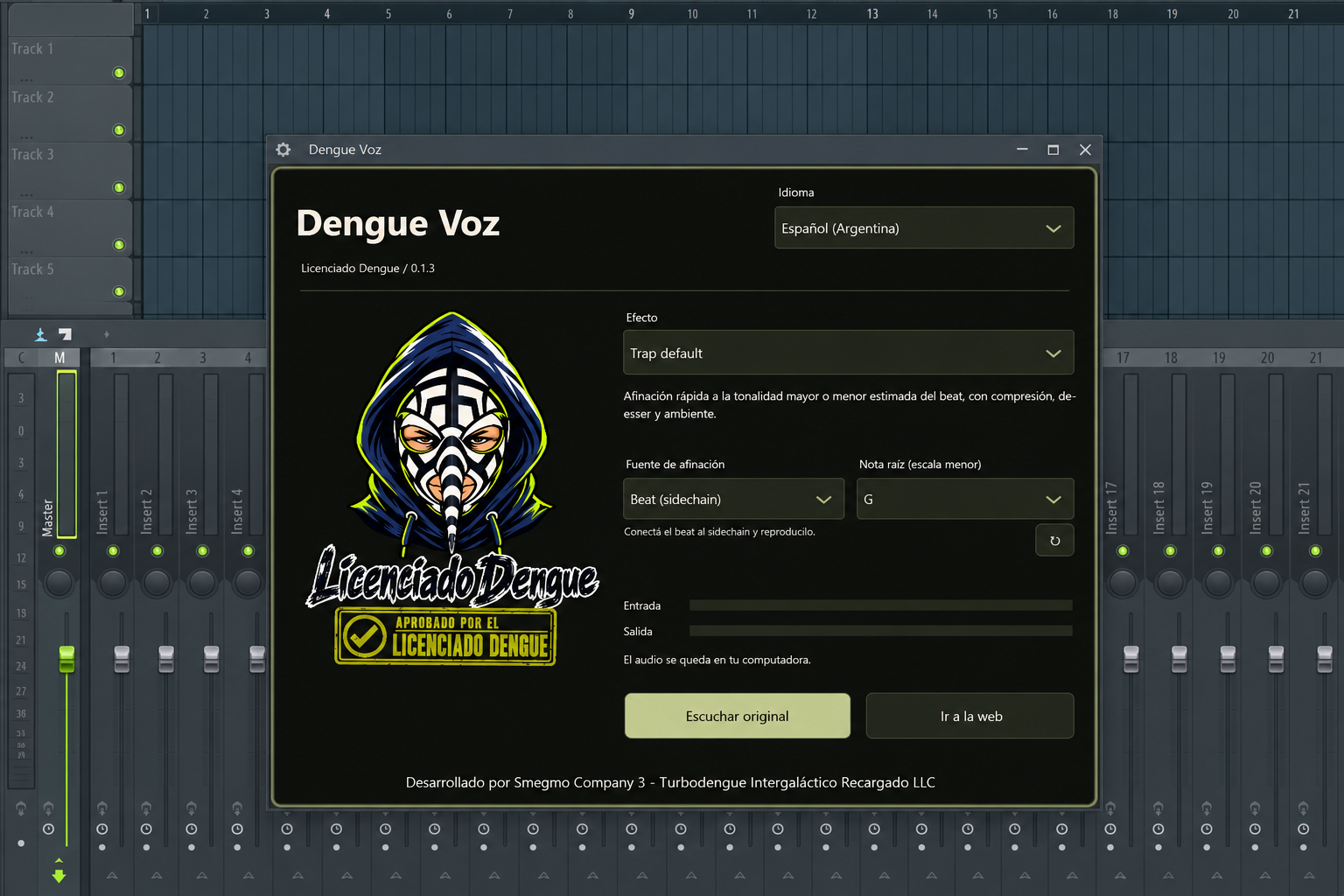
Aw pasarih phalna nei.
- Mosquito a ni
- Octave khat a sang a, aw te tak te leh bass tihtlem a ni.
- Setana lam a ni
- Octave khat hnuai lam, saturation leh khawvel dang echo a awm.
- Trap default
- Vocal chain chu beat atanga major emaw minor key emaw estimate-a tuned, emaw, minor scale-a manual note emaw hmanga tuned. EQ, compression, de-essing leh ambience te a ni.
- Dizzy mosquito a ni
- Aw sang tak, te tak te, a ri sang takah chuan awlsam taka a sang leh a tla thin.
- Cumbia
- Tuning nem tak, light compression leh echo tawi, roomy tak a ni.
- Reggaetón
- Tight tuning, firm compression leh stereo double tawi tak a awm bawk.
- Ultra edit a ni
- Hard tuning, formats thlak danglam leh tumruh taka robotic, digital texture hmanga siam a ni.
Master Dengue
Master channel-ah hman tur: gentle equalization, stereo compression leh limiter a awm.
File atanga FL Studio ah a awm.
Live vocal atan chuan headphone hmang la, volume hniam takah start rawh. Pitch siamthat hian latency a tipung.
1. Dengue Voz.vst3
FL Studio kha khar la, ZIP chu extract rawh.Dengue Voz.vst3folder pumpui chu dah khawm rawh.2. VST3
Chu folder chuC:\Program Files\Common Files\VST3\ah copy rawh. Windows chuan administrator phalna a dil thei.3. Options → Manage plugins
FL Studio hawn a ni.Options → Manage pluginsah kal la,Verify pluginsenable la,Find installed pluginskha click rawh.4. Mixer / Dengue Voz
Mixer ah chuan i recorded vocals kengtu channel kha thlang la, i microphone input kha assign rawh. Chu channel-a effect slot pakhatah chuanDengue Vozdah la.5. Aw pasarih phalna nei.
Effect thlang rawh. Trap default, Cumbia, Reggaetón leh Ultra edit a ni te hian beat reference emaw, manual root note emaw chu minor scale-ah an pe a. Inthlauhna atan Original ngaithla rawh hmang ang che. I settings vawng reng turin project chu save rawh.
Windows / macOS / Linux
Windows x64
ZIP chu extract rawh. Plugin folder zawng zawng chu a hnuaia VST3 directory-ah hian copy vek rawh. Tichuan FL Studio ah plugins te chu rescan leh ang che. Channel Rack-ah instruments hawn a, Mixer-ah vocal effect a awm bawk.
C:\Program Files\Common Files\VST3Options → Manage plugins → Find installed plugins
macOS 15+ / arm64 / x86_64
ZIP chu extract rawh. Plugin bundle zawng zawng chu a hnuaia directory tarlan ah hian copy vek rawh. I VST3 host kha restart la, a plugins te kha rescan leh rawh. MacOS 15 emaw a hnuai lam leh a inmil processor architecture a mamawh.
~/Library/Audio/Plug-Ins/VST3macOS: hun bituk hmanga hming ziah; Apple-in notarized a ni lo. System hian he app hi hawn phalna a dil thei a ni.
Linux x86_64
ZIP chu extract rawh. Plugin folder zawng zawng chu a hnuaia directory tarlan ah hian copy vek rawh. I VST3 host kha restart la, a plugins te kha rescan leh rawh. Linux x86_64 glibc 2.39 emaw a hnuai lam leh X11 nei a ngai.
~/.vst3Automated audio leh native interface test-ah a pass bawk. Taksa DAW-a ngaihthlak chu enfiah a la ngai a ni.
Beat hian key chu suggest rawh se.
Tuned modes te hian sidechain input hmangin instrumental second riat vel an analyse thei a. Estimated major emaw minor key chu i analyse leh hma loh chuan locked a ni reng.
1. Mixer / Sidechain to this track
Vocal Mixer track-ah
Dengue Vozdah rawh. Beat track ah chuan vocal track hnuaia routing arrow kha right click la,Sidechain to this trackkha thlang rawh.2. Processing → Connections / Beat
Plugin wrapper ah chuan
Processing → Connectionskha hawng la. Auxiliary input hmingBeatkha enable la, beat sidechain chu assign rawh. Vocal chu main input-ah dah reng ang che.3. Trap default / Cumbia / Reggaetón / Ultra edit a ni
Trap default, Cumbia, Reggaetón emaw Ultra edit a ni emaw thlang la, beat tuning source kha thlang rawh. Key a lo lang hma loh chuan bass emaw chord emaw hmangin section pakhat play rawh. Analyze-again control hmangin estimate dang tan rawh.
Hei hi estimate a ni a, thil chiang tak a ni lo. Drums chauh, sparse notes, key change leh relative major/minor key te hian result chu a chiang lo thei hle. Results chiang tak a awm loh chuan minor scale-a manual note hman a ni.
Manual source leh a root note chu engtik lai pawhin i thlang thei ang. Beat chu a thlirletna chauh a ni a; vocal output-ah a inhmeh lo. Audio chu i computer ah a awm reng thin.
Experimental automatic-a lehlin. Native-speaker review a awm lo. Thil tihsual a awm thei.