
Dengue Voz
Koj lub suab tam sim no nyob hauv Licenciado Dengue txoj cai.
ZIP / v0.1.5 / VST3
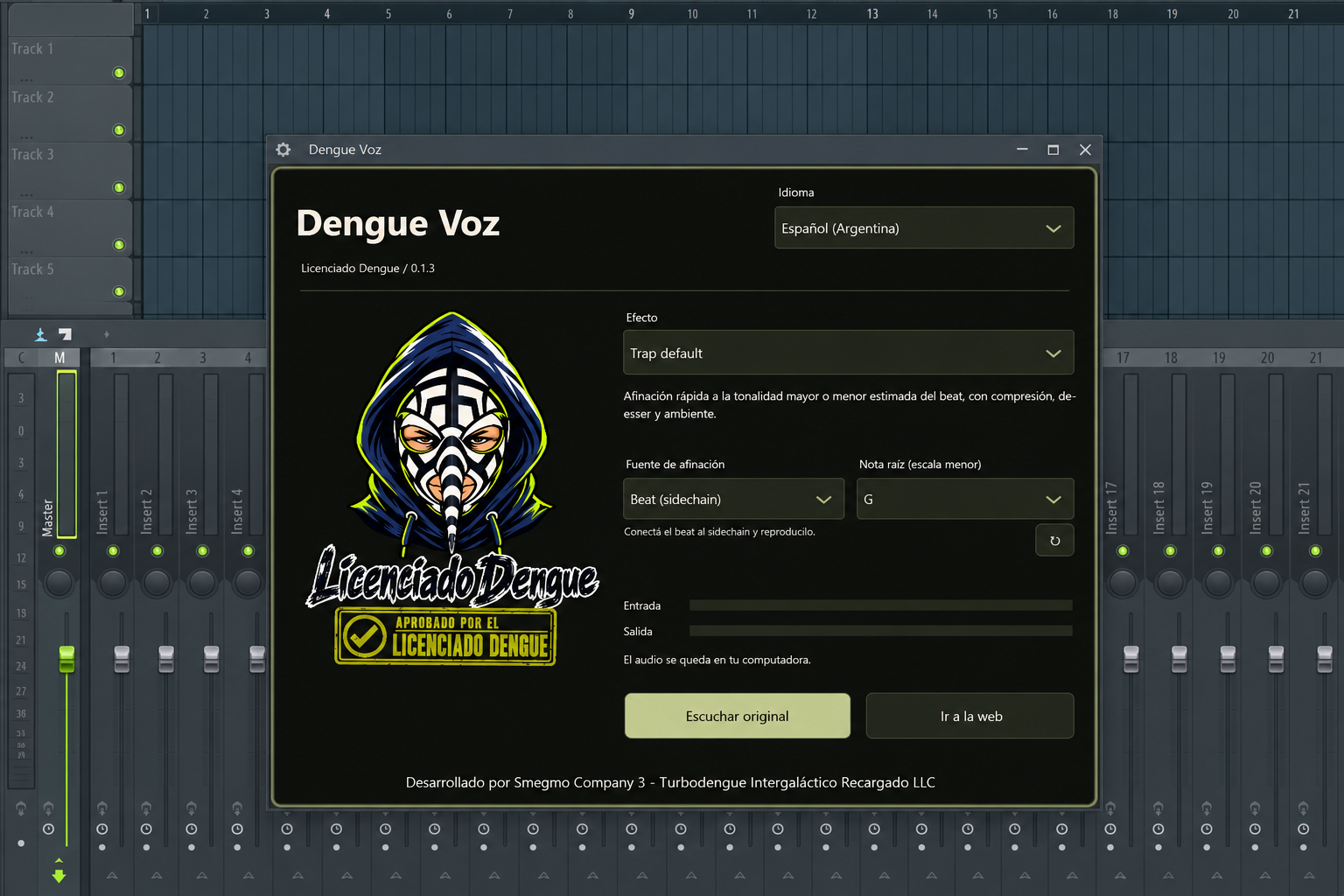
Xya lub suab tso cai.
- yoov tshaj cum
- Ib octave nce, ib lub suab nyias thiab txo bass thaj tsam.
- Dab Ntxwg Nyoog
- Ib qho octave down, saturation thiab lwm lub ntiaj teb ncha.
- Trap default
- Vocal chain tuned mus rau qhov loj lossis me qhov tseem ceeb kwv yees los ntawm kev sib tw, lossis phau ntawv qhia hauv qhov me me. EQ, compression, de-essing thiab ambience.
- Dizzy yoov tshaj cum
- Ib lub suab siab, nyias uas ntseeg nkaws nce thiab ntog hauv suab.
- Cumbia
- Yooj yim tuning, lub teeb compression thiab luv luv, roomy ncha.
- Reggaetón
- Tight tuning, ruaj compression thiab lub tso suab luv ob.
- Ultra kho
- Hard tuning, alterned formants thiab txhob txwm robotic, digital texture.
Master Dengue
Siv rau ntawm Master channel: kev sib npaug zoo, kev sib txuas lus stereo thiab lub limiter.
Los ntawm cov ntaub ntawv mus rau FL Studio.
Rau lub suab nrov, siv lub mloog pob ntseg thiab pib ntawm lub suab qis. Pitch kho ntxiv latency.
1. Dengue Voz.vst3
Kaw FL Studio thiab rho tawm ZIP. Khaws tag nrhoDengue Voz.vst3folder ua ke.2. VST3
Luam cov ntawv tais ceev tseg rau hauvC:\Program Files\Common Files\VST3\. Windows tuaj yeem thov kev tso cai rau tus thawj tswj hwm.3. Options → Manage plugins
Qhib FL Studio. Mus rauOptions → Manage plugins, pabVerify pluginsthiab nyemFind installed plugins.4. Mixer / Dengue Voz
Hauv Mixer, xaiv cov channel nqa koj lub suab kaw lossis muab koj lub microphone input. NtxivDengue Vozrau qhov cuam tshuam ntawm cov channel ntawd.5. Xya lub suab tso cai.
Xaiv cov nyhuv. Trap default, Cumbia, Reggaetón thiab Ultra kho muab ntaus siv lossis phau ntawv sau hauv paus hauv me me. Siv Mloog qub los sib piv. Txuag qhov project kom khaws koj qhov chaw.
Windows / macOS / Linux
Windows x64
Extract lub ZIP. Luam tag nrho cov ntaub ntawv plugin rau VST3 phau ntawv qhia hauv qab no. Tom qab ntawd rescan plugins hauv FL Studio. Qhib cov twj paj nruag hauv Channel Rack thiab cov suab nrov hauv lub Tov Khoom.
C:\Program Files\Common Files\VST3Options → Manage plugins → Find installed plugins
macOS 15+ / arm64 / x86_64
Extract lub ZIP. Luam tag nrho cov ntaub ntawv plugin rau hauv phau ntawv qhia hauv qab no. Pib dua koj tus tswv tsev VST3 thiab rov luam nws cov plugins. Yuav tsum tau macOS 15 lossis tom qab ntawd thiab qhov sib txuam processor architecture.
~/Library/Audio/Plug-Ins/VST3macOS: ad-hoc kos npe; tsis tau sau ntawv los ntawm Apple. Lub kaw lus yuav thov kev tso cai qhib lub app no.
Linux x86_64
Extract lub ZIP. Luam tag nrho cov ntaub ntawv plugin rau hauv phau ntawv qhia hauv qab no. Pib dua koj tus tswv tsev VST3 thiab rov luam nws cov plugins. Yuav tsum tau Linux x86_64 nrog glibc 2.39 lossis tom qab thiab X11.
~/.vst3Automated audio thiab haiv neeg interface xeem dhau. Kev mloog hauv DAW lub cev tseem yuav raug kuaj xyuas.
Cia tus yeej qhia tus yuam sij.
Cov qauv tuned tuaj yeem txheeb xyuas txog yim vib nas this ntawm cov cuab yeej siv los ntawm cov khoom siv sab hauv. Qhov kwv yees loj lossis tus yuam sij me yuav raug kaw kom txog thaum koj rov txheeb xyuas dua.
1. Mixer / Sidechain to this track
Muab
Dengue Vozrau lub suab Mixer khiav. Nyob rau hauv txoj kev khiav, right-click lub xub routing hauv qab lub suab khiav thiab xaivSidechain to this track.2. Processing → Connections / Beat
Nyob rau hauv lub plugin wrapper, qhib
Processing → Connections. Qhib lub koom haum pab tswv yim hu uaBeatthiab muab tus ntaus sidechain rau nws. Khaws lub suab ntawm lub ntsiab tswv yim.3. Trap default / Cumbia / Reggaetón / Ultra kho
Xaiv Trap default, Cumbia, Reggaetón lossis Ultra kho thiab qhov chaw sib tw. Ua ib ntu nrog cov ntses bass thaj tsam lossis chords kom txog thaum muaj tus yuam sij tshwm. Siv qhov kev txheeb xyuas-dua tswj kom pib lwm qhov kwv yees.
Qhov no yog kev kwv yees, tsis yog qhov tseeb. Drums ib leeg, cov ntawv tsis tshua muaj, cov kev hloov pauv tseem ceeb thiab cov yuam sij loj / me me tuaj yeem ua rau qhov tshwm sim tsis meej. Yog tias tsis muaj qhov tshwm sim meej, phau ntawv qhia hauv qhov ntsuas me yog siv.
Koj tuaj yeem xaiv phau ntawv qhia qhov chaw thiab nws cov ntawv hauv paus txhua lub sijhawm. Cov ntaus tsuas yog tsom xam; nws tsis yog tov rau hauv lub suab tso zis. Suab nyob hauv koj lub computer.
Kev sim txhais lus tsis siv neeg. Tsis muaj kev tshuaj xyuas cov neeg hais lus ib txwm muaj. Qhov yuam kev yog ua tau.